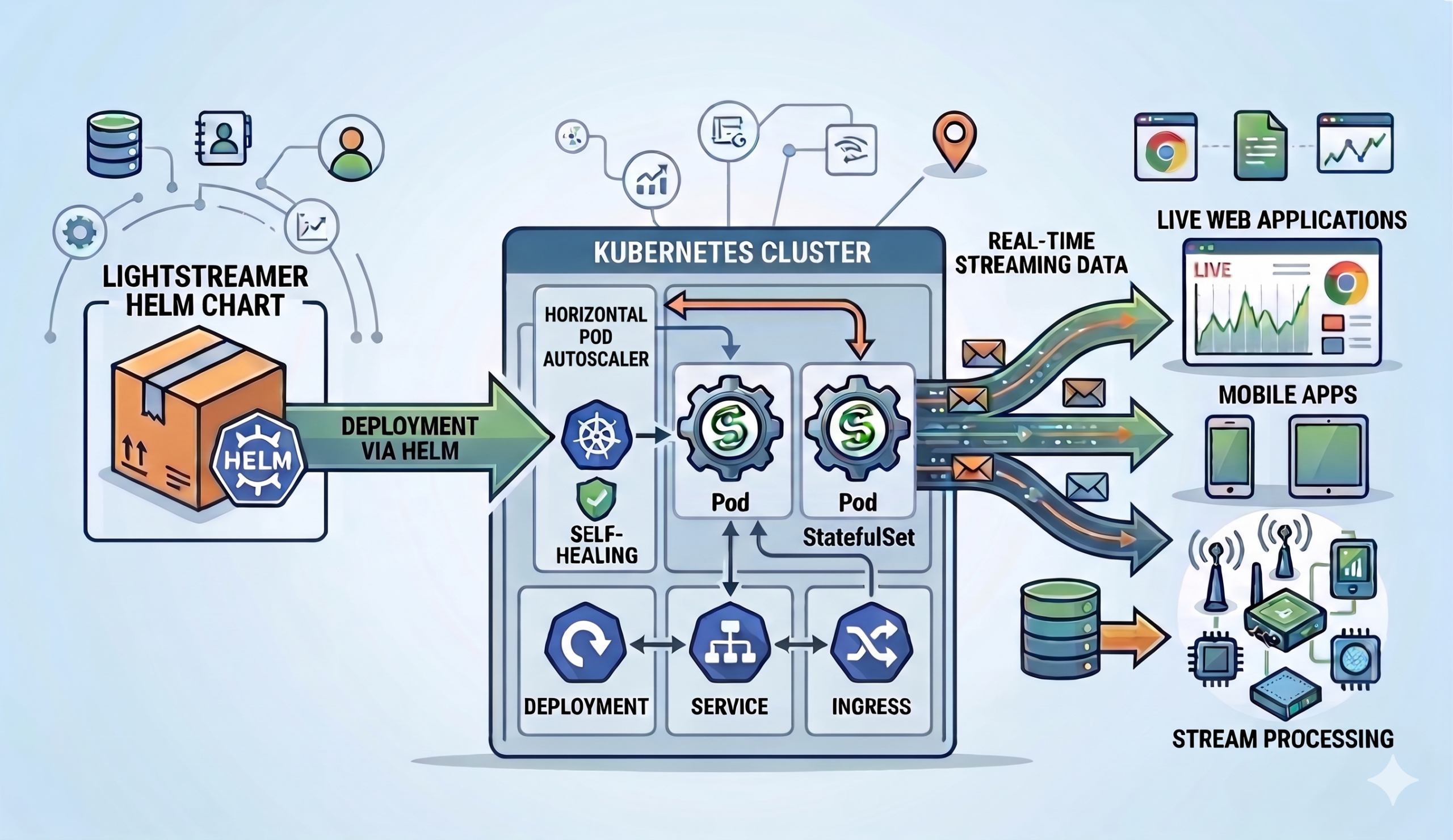
The Lightstreamer Helm Chart lets you deploy, configure, and scale the Lightstreamer Broker on Kubernetes through a single, declarative values.yaml file. Instead of hand-crafting Kubernetes manifests, you get reproducible configuration for TLS, health probes, rolling upgrades, horizontal scaling, adapters, and connectors — all managed by Helm and consistent across environments.
This post walks through what the chart offers, how it maps Lightstreamer’s configuration model to Kubernetes primitives, and why specific design decisions were made. Most importantly, every change can be previewed before it reaches the cluster — helm template renders manifests locally, helm diff shows the delta against a running release.
Quick start: install Lightstreamer on Kubernetes
The Lightstreamer Helm Chart lives in a public Helm repository. Three commands get you to a working deployment:
helm repo add lightstreamer https://lightstreamer.github.io/helm-charts
helm repo update
helm install lightstreamer lightstreamer/lightstreamer \
    --namespace lightstreamer --create-namespace
This deploys the Broker using the official lightstreamer Docker image with sensible evaluation defaults: a single replica, an HTTP server socket on port 8080, the Enterprise edition with a built-in Demo license (20 concurrent sessions), and the Monitoring Dashboard accessible without credentials. Everything you need to explore the platform — nothing you’d want in production. We’ll get to hardening shortly.
Conversely, the Community edition is equally straightforward — set license.edition: COMMUNITY and specify which Client API to enable. In other words, no license key, no secret, no external validation server.
Declarative Broker configuration
Every Lightstreamer configuration surface — server sockets, TLS, CORS, logging, adapters, connectors, JMX, push session tuning — maps to a Helm value. In turn, the chart’s templates render the corresponding Lightstreamer XML configuration files, Kubernetes Deployments, Services, Ingresses, and ConfigMaps at install time. As a result, you never author XML directly.
A few design principles make the configuration model practical at scale:
Everything is a Helm value. Take server sockets — the core of any Lightstreamer deployment. Specifically, each socket is a named entry under servers with its own port, name, TLS toggle, and protocol settings. You enable, disable, or add sockets purely through values — the chart renders the corresponding XML and wires the container ports, Service targets, and probe endpoints automatically:
servers:
  httpServer:
    enabled: true
    name: "HTTP Server"
    port: 8080

  httpsServer:
    enabled: true
    name: "HTTPS Server"
    port: 8443
    enableHttps: true
    sslConfig:
      keystoreRef: serverKeyStore
Define once, reference everywhere. For example, the keystoreRef above points to a named entry in the keystores section, where you define the Kubernetes Secrets holding the keystore file and its password. That same entry can be referenced from the JMX RMI connector, Proxy Adapter connections, or Kafka Connector broker links — one definition, multiple consumers, no duplication.
keystores:
  serverKeyStore:
    type: PKCS12
    keystoreFileSecretRef:
      name: server-keystore-secret
      key: keystore.p12
    keystorePasswordSecretRef:
      name: server-keystore-password
      key: password
Environment substitution with $env.<VAR>. The Broker resolves $env.<VAR> tokens in configuration values at startup. Combined with deployment.extraEnv, this lets you inject pod-specific or cluster-specific values — such as the node IP via the Kubernetes Downward API — without baking them into the Helm values. This mechanism is central to the clustering story (more on that below).
No hidden magic. No opaque operators, no CRDs, no controllers running in the background. For an existing release, helm get manifest shows exactly what’s deployed.
Full Kubernetes Deployment control. Beyond Lightstreamer-specific settings, the deployment section exposes standard Kubernetes primitives: replicas, rolling update strategy (maxSurge/maxUnavailable), resource requests and limits, scheduling constraints (nodeSelector, affinity, tolerations), pod and deployment annotations, init containers, extra volumes, and pre-start shell commands. Above all, the chart doesn’t lock you out of any Deployment capability. Similarly, the service section offers the same flexibility — Service type (ClusterIP, NodePort, LoadBalancer), externalTrafficPolicy, loadBalancerClass, and per-socket port mappings are all configurable.
Adapter and Connector configuration
Lightstreamer’s adapter model — Metadata Adapter for authentication and authorization, Data Adapter(s) for feeding real-time data — maps directly to the adapters and connectors sections of the Helm chart.
In-Process Adapters
In-Process Adapters run as Java classes inside the Broker’s JVM. You bake your adapter JARs into a custom Docker image or mount them from a PersistentVolume; the chart copies resources to the right directory at startup and renders the adapters.xml file from your Helm values — Consequently, you never ship an adapters.xml yourself.
You configure ClassLoader isolation per adapter:
| ClassLoader | Behavior | When to use |
|---|---|---|
common | Shared Adapter Set ClassLoader | Simple setups; adapters share dependencies |
dedicated | Isolated ClassLoader per adapter, inheriting from the Adapter Set ClassLoader | Conflicting dependency versions across adapters |
log-enabled | Isolated ClassLoader with access to the Broker’s SLF4J | Adapters that should integrate with Broker logging |
Additionally, a sharedDir mechanism lets multiple Adapter Sets share common libraries through a global ClassLoader, avoiding JAR duplication across adapter deployments.
Proxy Adapters
On the other hand, when your adapter logic runs outside the JVM — a Node.js process, a Python service, a .NET executable — Proxy Adapters bridge the gap over TCP. The chart exposes every knob: listening port, TLS, credential-based authentication of Remote Server connections, robust reconnection mode (the adapter tolerates temporary absence of the Remote Server), and IP-based access restrictions.
The Robust variant is particularly useful in Kubernetes, where Remote Server pods may restart independently of the Broker. With enableRobustAdapter: true, the Proxy Adapter accepts subscriptions even when the Remote Server is temporarily unavailable and delivers data as soon as the connection is re-established.
Kafka Connector
The Lightstreamer Kafka Connector ships as a first-class chart feature under connectors.kafkaConnector, not as a sidecar or an external dependency. You configure connections, topic routing, field mapping, and Schema Registry integration directly in values.yaml.
Key capabilities exposed through the chart:
- Multiple connection configurations for different Kafka clusters or authentication contexts
- Topic-to-item routing with template-based mapping (
stock-#{index=KEY}) - Serialization formats: String, JSON, Avro, Protobuf, key-value pairs
- Schema Registry integration for Avro, Protobuf, and JSON Schema
- TLS and SASL authentication (PLAIN, SCRAM, GSSAPI, AWS IAM)
- Dedicated logging configuration within the Broker’s logging framework
No sidecar containers, no additional Helm releases — the Kafka Connector deploys as part of the same Lightstreamer pod.
Flexible resource provisioning
A recurring pattern across In-Process Adapters, the Kafka Connector, and shared libraries is how the chart sources their resources. Every component that needs files at runtime supports two provisioning modes:
fromPathInImage— reference a path inside the container image. The chart’s init container copies the resources to the right deployment folder at startup. This is the recommended approach: you version resources with the image and need no external storage.fromVolume— mount a Kubernetes volume (PersistentVolumeClaim, ConfigMap, NFS, etc.) defined indeployment.extraVolumesand reference it by name, with an optional sub-path. Useful when resources are managed independently of the image — for example, adapter configuration files updated by a CI pipeline, or shared libraries hosted on shared storage across teams.
Both modes apply consistently to adapter sets (adapters.*.provisioning), the global shared directory (sharedDir), and connectors (connectors.kafkaConnector.provisioning). In addition, the Kafka Connector offers two extra options: fromGitHubRelease downloads the connector binaries from a specific GitHub release tag, and fromUrl fetches them from an arbitrary URL — both at startup, with no custom image build required.
Runtime features
Push session tuning
The pushSession section exposes the Broker’s core streaming settings — what happens inside each client connection. maxBufferSize caps the number of update events held per item buffer, sessionRecoveryMillis determines how long the server retains sent-event history so clients can recover transparently after a network glitch, and defaultKeepaliveMillis sets the baseline write-inactivity timeout before a keepalive is sent. In clustered deployments, keepalive and probe timeouts must be tuned in concert to avoid premature session drops across replicas.
The globalSocket section complements this with transport-level defaults that apply to every server socket: read and write timeouts, maximum request size, and WebSocket frame sizing. For instance, tightening read and handshake timeouts is a simple way to reclaim threads from slow or abusive clients in internet-facing deployments.
Mobile Push Notifications
The chart includes full configuration for the Mobile Push Notifications (MPN) module, which bridges Lightstreamer item subscriptions with Apple APNs and Google FCM. When the app is in the background, clients continue to receive push notifications driven by the same data feeds. However, the module requires a relational database for persistence (configured via JDBC settings and a credential secret), plus per-app configuration for Apple certificate keystores or Google Firebase service account JSON files. All of this is expressed in the mpn section of values.yaml — no sidecar, no external operator.
Web server
The built-in web server is often disabled in production, but it has a practical use case: serving a custom client UI from the same pod. Mount a volume containing your static resources via pagesVolume and the Broker serves them directly — no separate web server deployment needed. In fact, the Kafka Connector example uses exactly this pattern: an init container downloads the quickstart web client into a shared emptyDir, and the web server serves it at /QuickStart.
Production hardening and security
The Lightstreamer Helm Chart ships with evaluation-friendly defaults, but it also ships with a clear hardening path. A table in the deployment guide calls out every default that needs to change before going live:
| Concern | Default | Production action |
|---|---|---|
| Dashboard open to anyone | enablePublicAccess: true | Disable public access, configure credentials |
| CORS allows all origins | allowAccessFrom: "*" | Restrict to known client origins |
| Server version disclosed | FULL | Set to MINIMAL |
| Internal web server on | webServer.enabled: true | Disable unless serving static files |
| No TLS cipher filtering | removeCipherSuites: [] | Remove weak ciphers and protocols |
Beyond the checklist, several chart features target production reliability:
Probes. The deployment.probes section configures startup, liveness, and readiness probes. You can point each probe at the Broker’s built-in /lightstreamer/healthcheck endpoint via serverRef, or define a raw Kubernetes probe spec for custom setups. In particular, the startup probe prevents the liveness probe from killing the pod during slow initialization (adapter loading, connector connection establishment). Likewise, all probe tuning parameters — initialDelaySeconds, periodSeconds, failureThreshold — are exposed directly.
Graceful shutdown. When the RMI Connector is enabled and accessible, the chart registers a preStop lifecycle hook that calls LS.sh stop, giving the Broker time to drain sessions before Kubernetes sends SIGKILL.
Ingress timeouts. Lightstreamer uses long-lived streaming connections that outlast typical HTTP request timeouts. Therefore, configure appropriate proxy read/write timeout annotations on the Ingress controller (nginx, HAProxy) to prevent premature connection drops.
Security context. Pod-level and container-level security contexts are fully configurable. Moreover, the chart is compatible with OpenShift’s restricted-v2 SCC without requiring hardcoded UIDs.
Horizontal scaling and Lightstreamer clustering
Lightstreamer sessions are stateful: each session lives on a specific Broker replica. The Helm chart integrates with Kubernetes’ Horizontal Pod Autoscaler (HPA) while accounting for this statefulness.
Session affinity
In a clustered deployment, the Broker uses a control link mechanism: after session creation through the load balancer, the replica tells the client SDK where to send all subsequent requests. The chart supports multiple affinity strategies:
- Ingress sticky sessions — configure cookie-based affinity on your Ingress controller (nginx, HAProxy, OpenShift Route). No
controlLinkAddressneeded. - Host networking — bind the pod to the node’s network interface and advertise the node IP as the control link address via
$env.NODE_IP+ Downward API.
Specialized socket types
Server sockets can declare a portType that controls which traffic they accept. Beyond the default GENERAL_PURPOSE, clustered deployments can separate CREATE_ONLY sockets (for initial session creation through the load balancer) from CONTROL_ONLY sockets (for the control link, reached directly by clients). A PRIORITY socket bypasses backpressure queues entirely, keeping the Monitoring Dashboard responsive even when the Broker is under heavy load.
Bounded session lifetime
cluster.maxSessionDurationMinutes caps session length. When the session hits the limit, it closes gracefully, and the client reconnects through the load balancer — potentially landing on a different replica. As a result, long-lived sessions can no longer pin load to specific pods indefinitely and is essential for meaningful autoscaling.
Resource sizing for Kubernetes pods
The chart’s documentation recommends a specific approach to Kubernetes resource management for Lightstreamer workloads:
- Memory: set requests equal to limits (avoid OOM-kill risk under pressure)
- CPU: set requests but omit limits, allowing the Broker to burst when the node has spare capacity. With the
staticCPU manager policy, equal requests and limits pin exclusive cores for lowest-latency scenarios. - One replica per node: enforced through hard
podAntiAffinityonkubernetes.io/hostname, ensuring resource isolation and fault domain separation.
Furthermore, thread pool sizes (EVENTS, PUMP, SERVER, ACCEPT, TLS-SSL HANDSHAKE) are all tunable through the load section to match available cores and traffic profile.
Monitoring and observability
JMX
The Broker exposes its JMX interface through an RMI Connector (enabled by default on port 8888) or a JMXMP Connector. The chart creates a dedicated <fullname>-management Service for JMX traffic, keeping it separate from client-facing Services. TLS, authentication with multiple credential secrets, and cipher/protocol hardening are all configurable.
Monitoring Dashboard
The built-in web dashboard provides graphical monitoring statistics and a JMX Tree view for management operations. The chart exposes per-user access control (including per-user JMX Tree visibility), server binding restrictions, and a custom URL path — all as Helm values.
Logging
The logging system is fully declarative: primary loggers, subloggers, extra loggers, and appenders are all defined in values.yaml. For example, the DailyRollingFile appender can write to a Kubernetes volume (emptyDir or PVC) via volumeRef, making log persistence a one-line configuration change. Likewise, console appenders support custom patterns for integration with log aggregation pipelines.
Cloud and platform portability
The chart runs on vanilla Kubernetes and OpenShift. It addresses platform-specific concerns:- OpenShift: compatible with
restricted-v2SCC; documentation covers HAProxy Route annotations,anyuidgrants for host networking, and server-side image builds viaoc new-build - Private registries:
imagePullSecretsand customimage.repositorysettings - Cloud IAM: ServiceAccount annotations for AWS IRSA, GCP Workload Identity
- Vault / Istio: pod annotations for sidecar injection and secret injection
Upgrades and day-2 operations
The Lightstreamer Helm Chart supports a standard Helm upgrade workflow. Before applying changes, helm diff upgrade previews the delta (requires the Helm Diff plugin). helm upgrade then applies configuration changes or rolls the deployment to a newer chart version. Since helm template is always available to render manifests locally, CI pipelines can review changes before they reach the cluster.
When upgrading to a new chart version, pin image.tag to avoid unintended image changes on pod restarts, and always review the release notes — breaking changes to values.yaml keys may require updates to your values files.
Helm chart configuration examples
The following snippets illustrate the most frequent Lightstreamer Kubernetes deployment patterns. Each one is a self-contained fragment you can drop into your values.yaml.
Deploying an In-Process Adapter Set
Build a custom image that copies your adapter JARs into the Lightstreamer image, then point the chart at them:
image:
  repository: my-registry.example.com/lightstreamer-custom
  tag: "7.4.6"

adapters:
  myAdapterSet:
    enabled: true
    id: MY_ADAPTER_SET

    provisioning:
      fromPathInImage: /lightstreamer/adapters/my-adapter-set

    metadataProvider:
      inProcessMetadataAdapter:
        adapterClass: com.mycompany.adapters.MyMetadataAdapter

    dataProviders:
      marketData:
        enabled: true
        name: MARKET_DATA
        inProcessDataAdapter:
          adapterClass: com.mycompany.adapters.MarketDataAdapter
No adapters.xml to write — instead, the chart renders it from these values. The provisioning.fromPathInImage path tells the init container where to find the adapter resources in your custom image.
Connecting a Remote Adapter via Proxy
When the adapter logic lives outside the JVM, configure a Proxy Data Adapter and enable robust reconnection so the Broker survives Remote Server restarts:
adapters:
  myProxyAdapterSet:
    enabled: true
    id: MY_PROXY_ADAPTER_SET

    metadataProvider:
      inProcessMetadataAdapter:
        adapterClass: com.lightstreamer.adapters.metadata.LiteralBasedProvider

    dataProviders:
      remoteData:
        enabled: true
        name: REMOTE_DATA
        proxyDataAdapter:
          enableRobustAdapter: true
          requestReplyPort: 6661
The Remote Server (Node.js, Python, Go, etc.) connects to the Broker on port 6661. With enableRobustAdapter: true, the Broker accepts subscriptions even while the Remote Server is temporarily down and forwards them upon reconnection.
Streaming from Kafka to Lightstreamer
Wire a Kafka topic directly to Lightstreamer items — no glue code required. The Kafka Connector ships as a dedicated Docker image that already contains the connector binaries, so you just point image.repository at it:
image:
  repository: ghcr.io/lightstreamer/lightstreamer-kafka-connector
  tag: "1.5.1"

connectors:
  kafkaConnector:
    enabled: true
    adapterSetId: StockConnector

    provisioning:
      fromPathInImage: /lightstreamer/adapters/lightstreamer-kafka-connector

    connections:
      main:
        name: StockFeed
        enabled: true
        bootstrapServers: kafka.kafka.svc.cluster.local:9092

        record:
          consumeFrom: EARLIEST
          keyEvaluator:
            type: INTEGER
          valueEvaluator:
            type: JSON

        routing:
          itemTemplates:
            stockTemplate: "stock-#{index=KEY}"
          topicMappings:
            stocks:
              topic: stocks
              itemTemplateRefs:
                - stockTemplate

        fields:
          mappings:
            name: "#{VALUE.name}"
            last_price: "#{VALUE.last_price}"
            bid: "#{VALUE.bid}"
            ask: "#{VALUE.ask}"
            # ... additional fields as needed
Each Kafka record on the stocks topic becomes a Lightstreamer item named stock-<key>. The fields.mappings section extracts JSON fields from the record value using #{VALUE.<field>} expressions and maps them to Lightstreamer fields delivered to subscribers in real time. Since the connector image already bundles the adapter binaries at /lightstreamer/adapters/lightstreamer-kafka-connector, you need no custom image build — just set image.repository and configure the connections.
Enabling TLS with cipher hardening
Using the serverKeyStore entry defined in Declarative Broker configuration, enable HTTPS with protocol and cipher restrictions:
servers:
  httpsServer:
    enabled: true
    port: 8443
    enableHttps: true
    sslConfig:
      keystoreRef: serverKeyStore      # defined once in the keystores section
      removeCipherSuites:
        - TLS_RSA_
      removeProtocols:
        - SSL
        - TLSv1$
        - TLSv1\.1
The removeCipherSuites and removeProtocols entries use regex patterns to strip weak options from the JVM defaults. Notably, the same serverKeyStore entry can be referenced by the JMX connector, Proxy Adapter TLS, or Kafka Connector TLS.
Clustering with autoscaling
Combine the HPA, host networking for per-pod addressability, and bounded session lifetime for graceful scale-down:
deployment:
  hostNetwork: true
  dnsPolicy: ClusterFirstWithHostNet
  extraEnv:
    - name: NODE_IP
      valueFrom:
        fieldRef:
          fieldPath: status.hostIP
  affinity:
    podAntiAffinity:
      requiredDuringSchedulingIgnoredDuringExecution:
        - labelSelector:
            matchLabels:
              app.kubernetes.io/name: lightstreamer
          topologyKey: kubernetes.io/hostname

autoscaling:
  enabled: true
  minReplicas: 2
  maxReplicas: 10
  targetCPUUtilizationPercentage: 70

cluster:
  controlLinkAddress: "$env.NODE_IP"
  maxSessionDurationMinutes: 1440
As a result, each replica advertises its own node IP as the control link address. Meanwhile, the hard anti-affinity rule guarantees one pod per node. When the HPA scales down, maxSessionDurationMinutes ensures sessions eventually close gracefully — clients reconnect through the load balancer and land on surviving replicas.
Example projects
The Lightstreamer Helm Chart repository includes three self-contained examples, each with its own README and deployment scripts:
- In-Process Adapters — a Gradle project that compiles a Hello World adapter pair into a custom Docker image. Demonstrates image-based provisioning, ClassLoader configuration, and the built-in web server serving a test page.
- Proxy Adapters — a Node.js Remote Adapter running in its own pod, connecting to a Proxy Data Adapter over TCP. Shows mixed adapter configuration (In-Process Metadata + Proxy Data) and Robust Adapter reconnection.
- Kafka Connector — a Kubernetes port of the official Kafka Connector Quickstart. Deploys Kafka in KRaft mode, a stock market event producer, and the Lightstreamer Broker with the Kafka Connector consuming from the
stockstopic. Real-time stock prices stream to a web client in seconds.
Importantly, all three examples work on standard Kubernetes and OpenShift with no modifications (OpenShift-specific steps are documented where needed).
Getting started with the Lightstreamer Helm Chart
The chart, deployment guide, and full values.yaml reference are available on GitHub:
- Helm repository:
https://lightstreamer.github.io/helm-charts - Chart source and documentation: github.com/Lightstreamer/helm-charts
- Deployment guide: DEPLOYMENT.md
- Full values reference:
values.yaml
Add the repository, install the chart, and have a Lightstreamer Broker running on your Kubernetes cluster in under a minute. Whether you are deploying a single evaluation instance or a multi-replica production cluster with autoscaling and TLS, everything is driven by the same values.yaml workflow.
 Gianluca Finocchiaro
 Giuseppe Corti