The Lightstreamer Kafka Connector has always had a clear job description. Take events off a Kafka topic. Push them, over any network, to any number of subscribers — browsers, mobile apps, dashboards, backends — in realtime. Version 2.0, released alongside Lightstreamer Broker 7.4.8, changes what that job includes.
For years, integrators have been asking us variations of the same question. “A new user opens the trading dashboard at 3pm. The event stream started at 9am. What does the user see first?” “A browser tab reconnects after a laptop lid closes for two hours. Does it get the current state, or just whatever happens next?” “The seat map on my booking page: does every new visitor really need to wait for the next update to know which seats are taken?”
The traditional answer was: your problem. Either keep client-side state, add a REST snapshot endpoint, or compact the topic with your own signaling records. It worked. However, it pushed a distributed-state concern onto every team that adopted the connector.
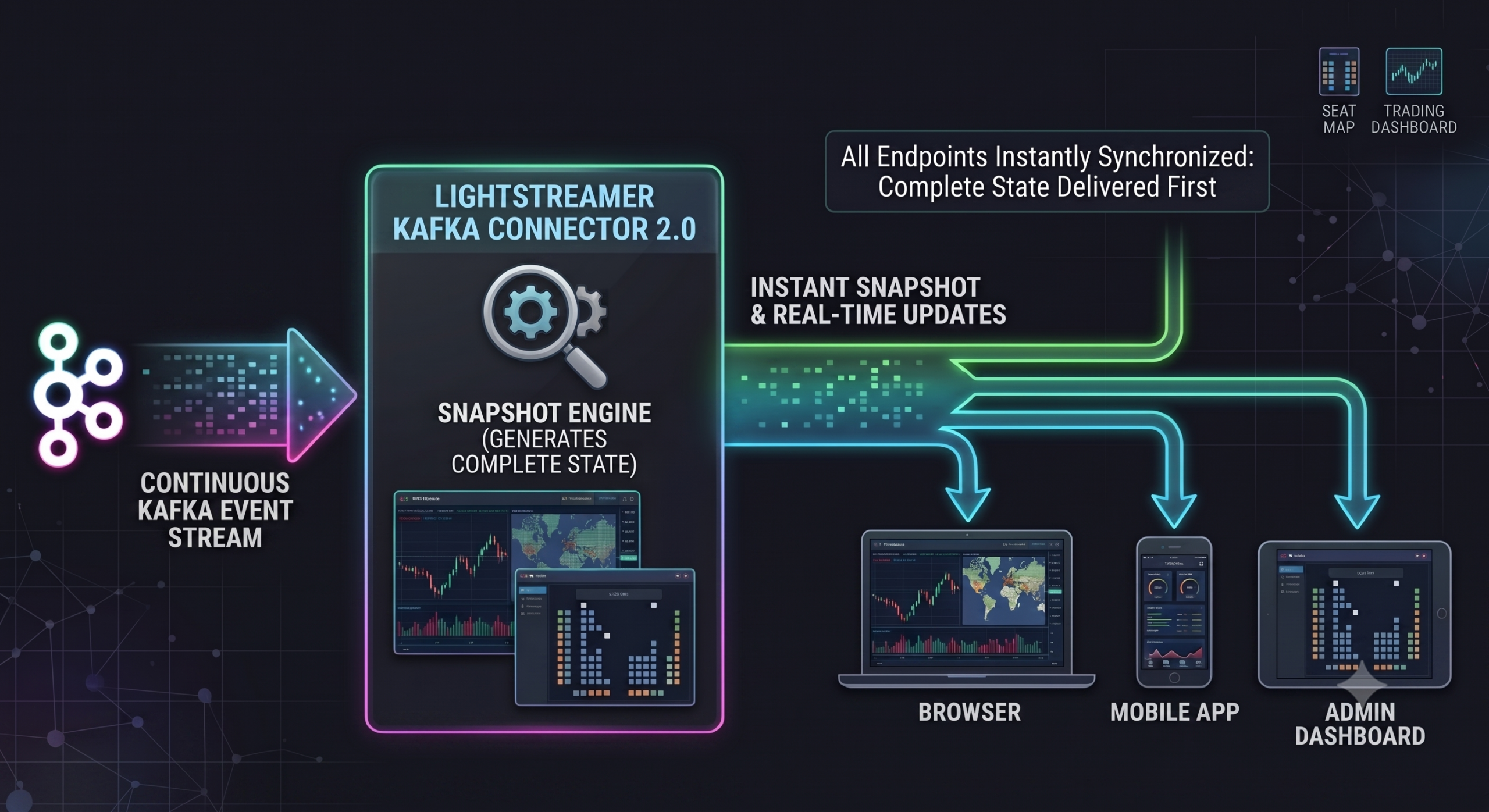
What 2.0 changes
The 2.0 release turns that around. Snapshot management is now a first-class concern of the connector itself. Importantly, the connector does not reinvent it. Lightstreamer Broker has long offered native snapshot handling for every subscription Mode it supports — MERGE, DISTINCT, and COMMAND. It provides per-item stores, deterministic snapshot-then-realtime delivery, and automatic re-delivery on client reconnect.
What 2.0 adds is the missing bridge. The connector now actively feeds and pre-seeds those Broker-side stores from the Kafka topic. When clients subscribe, the Broker’s snapshot machinery has the right state to serve. Set one parameter, pick one of three modes. Every subscriber then gets a coherent starting picture followed by realtime updates. That includes the first subscriber, the late one, and the reconnecting one. No client-side buffering, no bespoke signaling records, no separate REST endpoint.
That is the headline feature. However, there is plenty more in the box. It also covers per-item idle expiration, poison-pill tolerance, and a rebuilt Airport demo. This post walks through what changed, why it matters, and how it looks in practice.
What’s new at a glance
- Connector-managed snapshot via the new
item.snapshot.enabled.modeparameter, with three complementary modes:MERGE,DISTINCT, andCOMMAND. - Per-item idle expiration to keep memory bounded when many items go permanently silent.
- Poison-pill tolerance so that a single malformed record no longer aborts consumption.
- Airport demo, rebuilt to showcase
COMMAND-mode connector-managed snapshot as the flagship example. - Requires Lightstreamer Broker 7.4.8 or later, which introduces the APIs the new snapshot layer relies on.
- Breaking changes to the previous COMMAND-mode parameter surface, with a migration path documented in the migration guide.
The snapshot problem
Kafka is a log. Subscribers, especially over the last mile to web and mobile clients, arrive at arbitrary times. What they usually expect from a subscription is not the log. They expect the state you would get if you had been listening all along. That is followed by every change that happens from now on. Bridging those two shapes is the snapshot problem.
Made concrete. For example, a trading dashboard opened at 3pm should not have to wait for the next quote to display a price. Similarly, a seat map should show which seats are taken the moment the page loads, not once someone else books. And a departures board reconnecting after a laptop-lid closure should not lose the flights that changed status while it was away. In each case the subscriber needs a coherent picture of the current state on arrival. Additionally, a live tail must follow from there on.
Three DIY workarounds, all costly
Until 2.0, delivering that picture from a Kafka topic was the integrator’s problem. The three usual workarounds all cost real engineering effort:
- Client-side buffering. Every application has to accumulate and reconcile state, and every new client type re-implements it.
- A bespoke REST snapshot endpoint paired with the streaming subscription. Two code paths, two failure modes, and a well-known race window at the seam.
- Manual signaling records on a compacted topic, to tell downstream consumers when the initial replay is done.
Each works. Each pushes distributed-state concerns onto every team that adopts the connector.
Version 2.0 solves it inside the connector, once, for anyone downstream.
Connector-managed snapshot: one parameter, three shapes
The entire feature is gated by a single new parameter, item.snapshot.enabled.mode. Left at its default value of NONE, the connector behaves the way it always has. In other words, it forwards realtime events to whoever is subscribed. However, set to any other value, the connector takes responsibility for materializing and serving the snapshot for every item it publishes.
Under the hood, the change is significant. As soon as the connector binds to the Lightstreamer Broker, the internal Kafka consumer starts eagerly. That happens before any client has subscribed. First, it replays the topic from the beginning and feeds the resulting events into the Broker’s per-item store. Only after that seeding is complete does it transition to realtime tailing. Then, when a client subscribes, the Broker delivers whatever the store currently holds as the snapshot. Finally, the realtime tail is spliced in seamlessly.
Late subscribers get the full picture. Reconnecting clients get it too. Importantly, all of this lives inside the connector and the Broker. Consequently, browsers and mobile apps do not have to know it exists.
The three non-default modes each solve a different shape of the same problem.
MERGE — the latest value per item
This is the shape most streaming dashboards need: one item, one current value. A price for AAPL, a temperature for sensor-042, a status for order-9917. The per-item store keeps only the latest event; the snapshot is a single message per item.
<param name="item.snapshot.enabled.mode">MERGE</param>
A client subscribing to the item receives one event as the snapshot — the latest known value. Every subsequent update follows as it happens.
Suitable for: quote feeds, dashboards, key/value-shaped state, gauges, most kinds of “current reading”.
DISTINCT — the last N events per item
Sometimes the interesting thing is not the current value but the recent history. For example: a running scoreboard, the last few log lines from a service, or the last handful of trades that crossed. Accordingly, DISTINCT mode maintains a bounded FIFO per item, sized by the new item.snapshot.distinct.length parameter (default 10).
<param name="item.snapshot.enabled.mode">DISTINCT</param>
<param name="item.snapshot.distinct.length">50</param>
A new subscriber receives up to 50 snapshot events, in the original publish order, then continues in realtime. The FIFO cap is enforced by the Broker. The connector never has to guess how many events to hold on to.
Suitable for: activity feeds, alert timelines, recent-trades panels, service log ribbons, “last N” widgets of every kind.
COMMAND — dynamic tables with ADD / UPDATE / DELETE
In COMMAND mode, a Lightstreamer item is not a single value or a stream of events. It is a dynamic table: a live row set keyed by a stable identifier. Its rows are inserted, updated, and removed as the underlying stream evolves. Subscribers see a table that mirrors the current shape of the topic. No client-side reconciliation code, no manual bookkeeping over which keys are still active.
This is the mode that will feel most magical to anyone who has ever hand-built a “current set of things” view over Kafka.
The connector tracks per-(item, key) state internally. Every record on the topic is translated into a Lightstreamer command automatically. The choice depends on what the connector has seen so far:
- A key seen for the first time becomes an
ADD(a new row). - A key seen again becomes an
UPDATE(an existing row is modified). - A tombstone (a Kafka record with a
nullvalue) becomes aDELETE(the row is removed).
Late subscribers receive the entire currently-materialized row set as a sequence of ADDs — that is the snapshot. Live inserts, updates, and deletions then arrive as they happen.
<param name="item.snapshot.enabled.mode">COMMAND</param>
<param name="field.key">#{KEY}</param>
Note what is not in the snippet: field.command. In connector-managed COMMAND mode, the connector synthesizes the command field itself. You do not map it. That is the whole point of “managed”.
Suitable for: order books, seat maps, availability boards, active-session lists, “who is online” panels, live inventory. In fact, a compacted topic whose keys and tombstones already model a current row set is a natural fit. COMMAND mode consumes that shape directly, with no signaling records needed.
Manual COMMAND mapping is still supported
Some pipelines already emit their own op-codes in the payload. This is common for change-data-capture (CDC) streams from Debezium, Maxwell, or similar. For those, connector-managed synthesis would be redundant. The manual route fits whenever the producer already tells you what to do. Common examples:
- Debezium’s
opfield (c/u/d). - Maxwell’s
type(insert/update/delete). - A hand-rolled equivalent from Kafka Connect’s JDBC source.
- An application-defined op-code baked into the payload schema.
The 2.0 release keeps that route intact. Leave item.snapshot.enabled.mode at its default NONE, and map both field.key and field.command explicitly.
<param name="field.key">#{KEY}</param>
<param name="field.command">#{VALUE.op}</param>
The connector forwards the records as-is; it does not track state, does not synthesize commands, does not materialize a snapshot. The trade-off: late subscribers see an empty table until the next realtime record arrives. Tombstones cannot signal deletion either — there is no VALUE.op to extract from a null payload. For the “current row set on subscribe, tombstones drive deletions” shape, item.snapshot.enabled.mode = COMMAND is the right choice. For the “my producer already tells me what to do” shape, the manual route continues to fit.
Per-item idle expiration
One of the practical questions raised by connector-managed snapshot is: what happens when an item goes quiet for a long time? For example, a trading symbol that stops trading overnight. Or a user session that ends. Or a device that goes offline for hours. In each case, the item would otherwise leave a stale snapshot hanging around. Consequently, the next record that eventually arrives would be merged on top of it as if nothing had happened.
Version 2.0 introduces item.snapshot.max.idle.seconds for exactly this. Once an item has been idle for longer than the configured interval, its snapshot is discarded. The next incoming record then starts a fresh snapshot rather than being merged on top of stale state. Late subscribers that connect after the discard see the fresh sequence, not the outdated one. The idle clock is sliding. Every record routed to an item resets it. Items that keep receiving traffic are never considered idle.
<param name="item.snapshot.max.idle.seconds">30</param>
The default is 0, which disables the check. That is appropriate when the snapshot’s freshness is not a concern, or when items receive traffic continuously. Set it to a positive value when the natural cadence of the topic makes a long-stale snapshot misleading. Common cases: end-of-session data, or partitions that go silent between bursts. Also per-user or per-device streams where a stale row is worse than no row.
The parameter is intentionally non-negative rather than boolean-plus-timeout. A single number is easier to reason about, and 0 is a natural sentinel for “off”.
Poison-pill tolerance
A less flashy but very welcome change: a single malformed record no longer aborts consumption.
Under the previous behavior, one deserialization error could bring the topic-side loop down. In practice, one corrupt event or one schema hiccup on a producer could take a running stream offline. Then an operator had to intervene. Moreover, the failure modes are ones every Kafka operator eventually meets:
- Schema-registry drift after a compatibility rule change.
- A producer still running an older serializer during a rolling deployment.
- A stray record written with the wrong encoding.
- A subject/topic mapping that briefly points at the wrong schema after a migration.
In 2.0, however, records that fail deserialization are logged at WARN with topic, partition, and offset. The connector then moves on. As a result, the rest of the records from that poll flow through. Downstream subscribers keep receiving updates. Moreover, the log line carries the exact coordinates of the offending record. An operator therefore has everything needed to reproduce, inspect, or delete it. In short, what used to be a fire drill becomes an entry in the alerting dashboard.
Safety net for total failure
If every record returned by a single poll fails, however, the connector fails fast rather than silently discarding an entire stream. That pattern almost always means a systemic misconfiguration. For example, a wrong deserializer, a schema URL pointing at the wrong registry, or a corrupt topic. Quiet dropping would only mask it. In short, isolated bad records are tolerated; a broken pipeline is escalated.
The Airport demo, rebuilt from the ground up
The Airport demo has been a fixture of the connector examples for a while. Version 2.0 rebuilds it as the flagship showcase for COMMAND-mode connector-managed snapshot. The scenario is departures and arrivals boards that update in realtime. It maps naturally onto a COMMAND-mode item. Each flight is a row. New flights are ADDs, status changes are UPDATEs, and departed or cancelled flights are DELETEs driven by tombstones. Every browser tab that joins the demo sees the full board at the moment it connects. Live changes keep arriving from then on.
It is the shortest path from “clone this repository” to “watch a live flight board that recovers correctly for every new subscriber and every reconnect”. If you want to understand what the new snapshot machinery actually feels like, this is the place to start.
Breaking changes, and how to migrate
Version 2.0 unifies several parameter surfaces that had accumulated over 1.x. The unification covers COMMAND-mode activation, the snapshot lifecycle, and a few consumer-side parameters. All of them behave differently when connector-managed snapshot is active. If you are upgrading from 1.x, do not skip the migration guide. It walks through every removed and renamed parameter, with the exact one-line replacements. Most 1.x deployments only need cosmetic changes. The few that used the old COMMAND-mode flags need a small edit to gain the new behavior.
Minimum Lightstreamer Broker version. The new snapshot layer relies on APIs introduced in Lightstreamer 7.4.8, which is now the minimum required Broker version. Plan a Broker upgrade alongside the connector bump.
Getting started
A few ways to try 2.0 today, in increasing order of realism:
- The quickstart. One command brings up the full stack: Kafka broker, connector, and web UI. It streams a simulated market feed to a browser tab. The fastest path from zero to a running realtime stream. Docker, Docker Compose, and a JDK 17+ on the host are all it needs.
- The Airport demo. Same one-command startup, but with a live departures/arrivals board that showcases
COMMAND-mode connector-managed snapshot from a subscribers-and-reconnects perspective. Open multiple tabs; each one gets the full board the moment it connects. - The pre-built bundle attached as an asset to the v2.0.0 GitHub release. Unzip it into your existing Lightstreamer Broker’s
adapters/directory, editadapters.xmlto point at your Kafka cluster, and restart. The fit for teams that already run a Broker on VMs or bare metal. - The official Docker image at
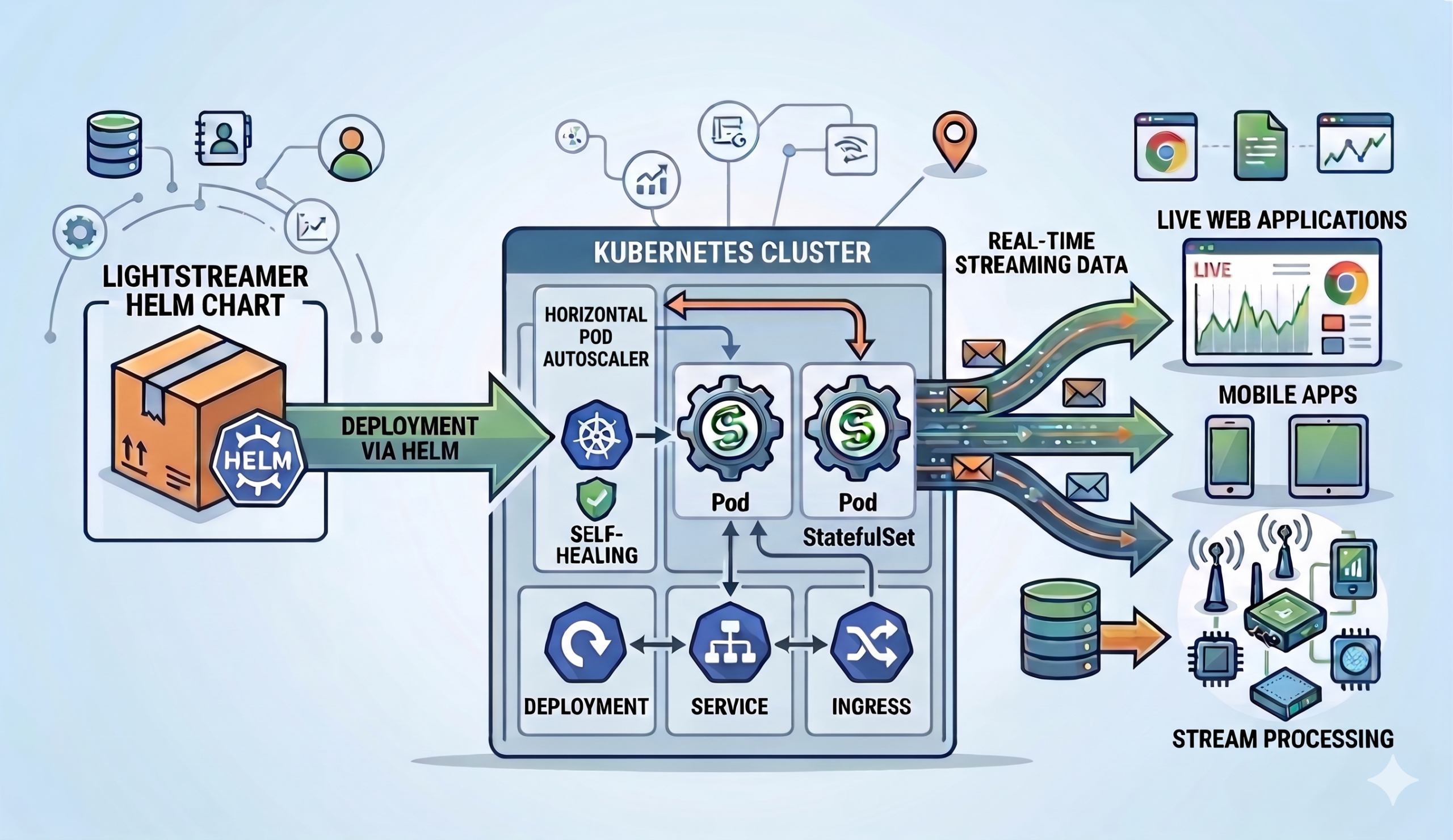
ghcr.io/lightstreamer/lightstreamer-kafka-connector, published for every release. Pull it, mount your ownadapters.xml, and point it at your Kafka cluster. Then integrate into whatever container-based deployment flow you already have. - The Lightstreamer Helm Chart for Kubernetes. Deploy the Broker + Kafka Connector image as a rolling-updatable release on any cluster. Chart values cover adapter configuration and replica sizing. Finally, the path to production for anyone standardized on Kubernetes.
In closing
Version 2.0 does not change what the Kafka Connector is for. Bridging Kafka to the last mile has been the mission from day one. However, 2.0 does change how much of the state-consistency problem lives inside the bridge. As a result, less of it now lives in every application on the other side. For the deeper technical treatment, head to the README. Specifically, it covers extraction layouts, per-mode snapshot shapes, and the full set of caveats. In particular, the Snapshot management and COMMAND mode field mapping chapters go where this post cannot. In short, this is a shift we think will pay off across a lot of very different pipelines. Finally, we would love to hear how it lands with yours.
 Gianluca Finocchiaro
 Giuseppe Corti